Text message program
Text messages from HomeSturdy are optional and off by default. Nothing is ever sent to a number until its owner has added it inside their own HomeSturdy account and confirmed a code we text to it.
How you opt in
The opt-in happens inside the HomeSturdy app (iOS, or on the web at web.homesturdy.app), under Settings → Notifications → Text messages. It is a double opt-in:
- A signed-in user enters their mobile number in the phone-number field. Beneath it is an unchecked checkbox with the consent language below. The Text me a code button stays disabled until the user checks the box, so consent is never pre-selected or assumed.
- HomeSturdy texts a 6-digit code to that number.
- The user types the code back into the app. Only when the code is confirmed is the number marked verified and text messages enabled.
The opt-in form
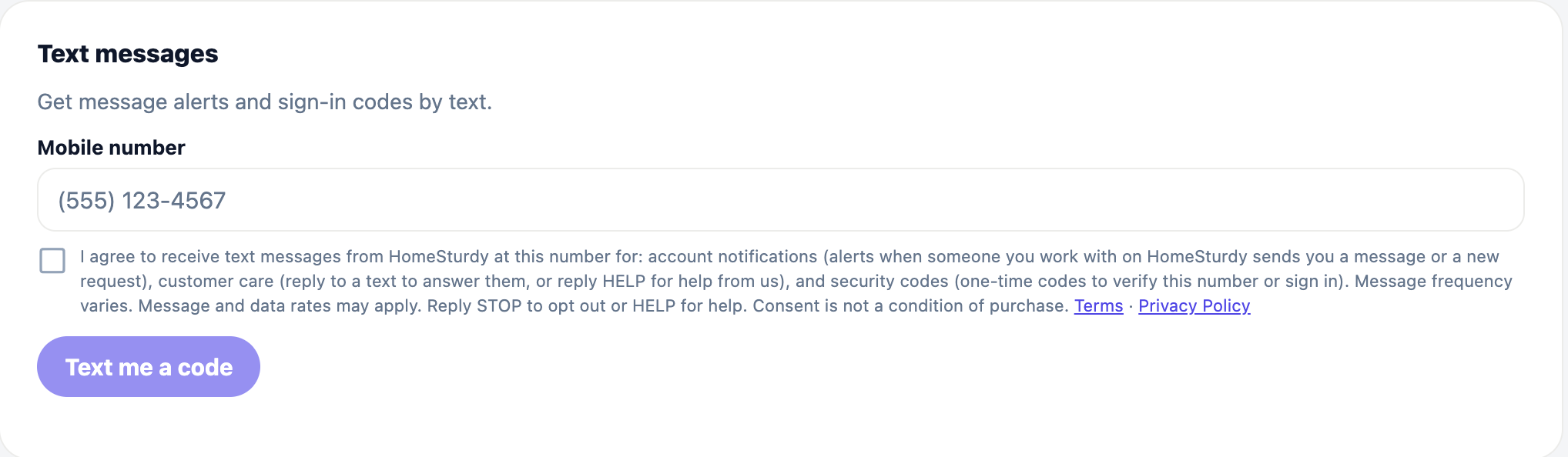
The checkbox shown with the phone-number field
☐ I agree to receive text messages from HomeSturdy at this number for: account notifications (alerts when someone you work with on HomeSturdy sends you a message or a new request), customer care (reply to a text to answer them, or reply HELP for help from us), and security codes (one-time codes to verify this number or sign in). Message frequency varies. Message and data rates may apply. Reply STOP to opt out or HELP for help. Consent is not a condition of purchase. Terms · Privacy Policy
Program details
| Program name | HomeSturdy |
|---|---|
| Who gets texts | HomeSturdy users who opted in: homeowners and the contractors they work with through the app. |
| Use cases | Account notifications: an alert when someone you work with on HomeSturdy sends you a message or a new request. Customer care: reply to a text to answer them (your reply is posted to that conversation in the app), or reply HELP for help from us. Security codes: one-time codes to verify your number or sign in. No marketing or promotional messages are sent. |
| Example messages | HomeSturdy: Acme Roofing replied about "Fall gutter clean". Reply to this text to answer them, or open https://web.homesturdy.app/m/qp_8f21c4a9-3e7d-4b1a-9c05-2d6e8a1b7f34. Reply STOP to opt out. HomeSturdy: Jane D. sent you a new service request: "Fall gutter clean". Open https://web.homesturdy.app/m/qp_8f21c4a9-3e7d-4b1a-9c05-2d6e8a1b7f34 to view and reply. Reply STOP to opt out. HomeSturdy: Jane D. sent you a message about "Fall gutter clean". Reply to this text to answer them, or open https://web.homesturdy.app/m/qp_8f21c4a9-3e7d-4b1a-9c05-2d6e8a1b7f34. Reply STOP to opt out. HomeSturdy: 483920 is your verification code. It expires in 10 minutes. Reply STOP to opt out. HomeSturdy: 483920 is your sign-in code. It expires in 10 minutes. Reply STOP to opt out. |
| Message frequency | Varies, and depends on your own activity. There is no fixed schedule — you normally receive a text only when someone you work with on HomeSturdy messages you, or when you ask for a code. |
| Cost | HomeSturdy does not charge for texts. Message and data rates may apply from your mobile carrier. |
| Quiet hours | Notification texts are not sent between 9pm and 8am in your local time. |
| Opt out | Reply STOP to any message, or turn texts off under Settings → Notifications in the app. |
| Help | Reply HELP, or email support@homesturdy.app. |
| Carriers | Supported carriers may change without notice. Delivery is not guaranteed and depends on your carrier. |
Privacy
Mobile numbers and SMS consent are never sold, rented, or shared with third parties or affiliates for their own marketing purposes. The only third party that receives your number is our messaging provider, purely to deliver the texts you asked for. See the Privacy Policy and section 10 of the Terms.